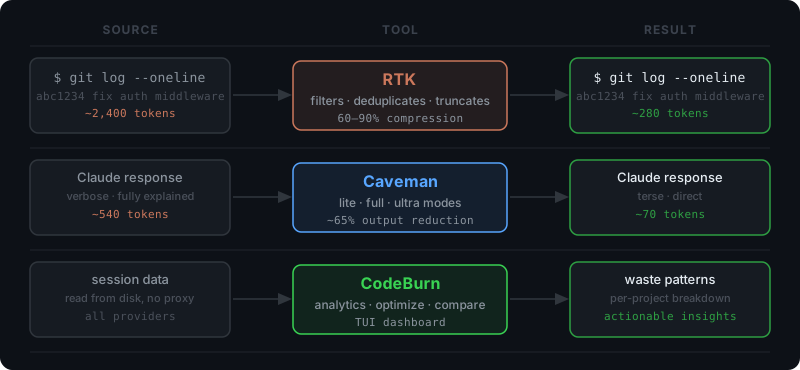
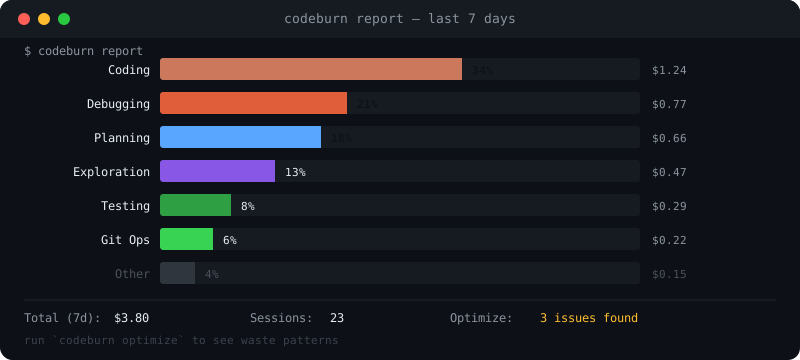
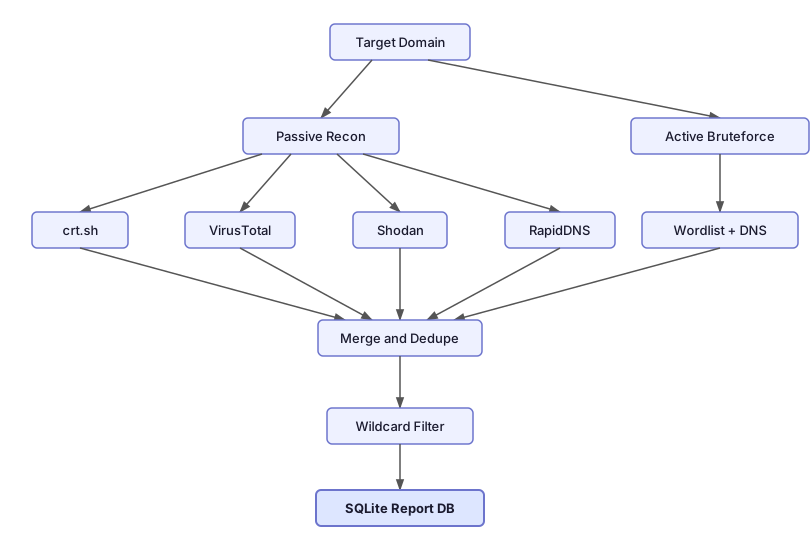
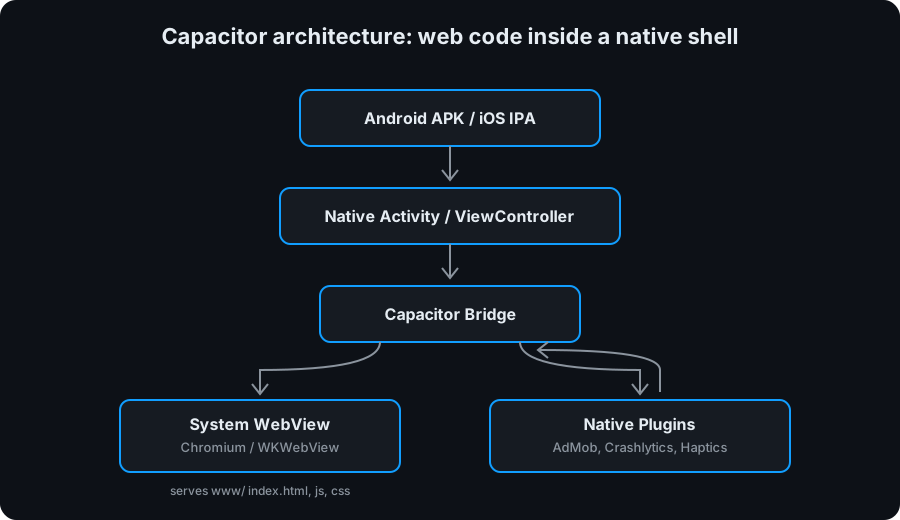
<?xml version="1.0" encoding="utf-8"?><feed xmlns="http://www.w3.org/2005/Atom" xml:lang="en"><generator uri="https://jekyllrb.com/" version="4.4.1">Jekyll</generator><link href="https://www.vchalyi.com/feed.xml" rel="self" type="application/atom+xml"/><link href="https://www.vchalyi.com/" rel="alternate" type="text/html" hreflang="en"/><updated>2026-04-25T02:26:14+00:00</updated><id>https://www.vchalyi.com/feed.xml</id><title type="html">Viktor Chalyi - VP of Engineering | Director of Engineering | Engineering Manager</title><subtitle>VP of Engineering · Director of Engineering · Engineering Manager in NYC · 14+ years in software development and technology management roles · AI, Telecom &amp; Fintech · Driving innovation through strategic engineering growth &amp; hands-on expertise.</subtitle><entry><title type="html">Claude Code Token Limit: How to Stretch Your Daily Budget</title><link href="https://www.vchalyi.com/blog/2026/claude-code-token-limit/" rel="alternate" type="text/html" title="Claude Code Token Limit: How to Stretch Your Daily Budget"/><published>2026-04-24T09:00:00+00:00</published><updated>2026-04-24T09:00:00+00:00</updated><id>https://www.vchalyi.com/blog/2026/claude-code-token-limit</id><content type="html" xml:base="https://www.vchalyi.com/blog/2026/claude-code-token-limit/"><![CDATA[<p>Every Claude Code Pro session starts with a quiet tax: CLAUDE.md loads, MCP servers initialize, skills register. Before you type a single message, roughly 10,000 tokens are gone. Plan a feature, revise the spec, iterate on the approach. You’re already at 40% of your 5-hour budget. Start implementing, debug what broke, verify it works, and the limit hits. You wait. The momentum is gone.</p> <hr/> <h2 id="why-claude-code-token-limits-break-your-flow">Why Claude Code Token Limits Break Your Flow</h2> <figure> <picture> <source class="responsive-img-srcset" srcset="/assets/img/blog/2026-04-24-claude-code-token-limit-flow.svg" sizes="95vw"/> <img src="/assets/img/blog/2026-04-24-claude-code-token-limit-flow.svg" class="img-fluid rounded z-depth-1" width="100%" height="auto" alt="Diagram showing three tools intercepting token consumption at different points in a Claude Code session" loading="eager" onerror="this.onerror=null; $('.responsive-img-srcset').remove();"/> </picture> </figure> <p>The token ceiling is not just a billing constraint. It is a pacing problem. Sessions have a natural shape: orient, plan, build, verify. That arc fits inside a 5-hour window only if token spend is efficient. Most sessions are not efficient, not because of waste in the obvious sense, but because of structure. Every <code class="language-plaintext highlighter-rouge">git status</code> dumps verbose output into the context. Every explanation Claude gives is written for a patient reader rather than someone who already knows the domain. Every file that was read once stays in context whether it matters anymore or not. The result is a session that burns through budget on overhead instead of work.</p> <p>Three tools attack this from different angles. <a href="https://github.com/rtk-ai/rtk">RTK</a> compresses what goes into context. <a href="https://github.com/juliusbrussee/caveman">Caveman</a> trims what comes out of the model. <a href="https://github.com/getagentseal/codeburn">CodeBurn</a> shows where the remainder goes so you know what to fix next. None of them require changes to how you work. Install them once and they run in the background.</p> <hr/> <h2 id="rtk-compress-what-goes-into-context">RTK: Compress What Goes Into Context</h2> <p>Command output is one of the largest and most overlooked sources of token consumption in a Claude Code session. A <code class="language-plaintext highlighter-rouge">git log</code> with a hundred entries, a <code class="language-plaintext highlighter-rouge">docker ps</code> with a dozen containers, an <code class="language-plaintext highlighter-rouge">npm install</code> with its full dependency tree: all of it lands in context verbatim unless something intercepts it first. RTK is that interceptor.</p> <p>RTK is a single Rust binary that acts as a proxy for common shell commands. It supports 100+ commands across git, npm, cargo, docker, and other ecosystems. The interception is transparent: a hook rewrites <code class="language-plaintext highlighter-rouge">git status</code> to <code class="language-plaintext highlighter-rouge">rtk git status</code> automatically, so nothing in your workflow changes. What changes is the output: filtered, grouped, deduplicated, and truncated to what Claude actually needs to make a decision.</p> <p>The numbers are concrete. In a typical 30-minute coding session, RTK reduced token consumption from approximately 118,000 tokens to 23,900, an 80% reduction on command output alone. Across a full development session, <a href="https://www.vchalyi.com/blog/2026/claude-code-best-practices/">Claude Code best practices</a> point to bash output as a primary driver of context bloat. RTK addresses that directly.</p> <p><strong>Install:</strong></p> <div class="language-bash highlighter-rouge"><div class="highlight"><pre class="highlight"><code><span class="c"># Homebrew</span>
brew <span class="nb">install </span>rtk-ai/tap/rtk

<span class="c"># Or curl</span>
curl <span class="nt">-sSL</span> https://raw.githubusercontent.com/rtk-ai/rtk/main/install.sh | bash
</code></pre></div></div> <p>After installation, add the hook to your Claude Code configuration or run <code class="language-plaintext highlighter-rouge">rtk gain</code> to verify savings from your sessions.</p> <hr/> <h2 id="caveman-make-claude-stop-over-explaining">Caveman: Make Claude Stop Over-Explaining</h2> <p>RTK handles the input side. Caveman handles the output side. By default, Claude writes responses for a general audience: full sentences, examples, context, summaries. For a developer in the middle of a session who already knows the codebase and just asked a specific question, most of that text is noise. Caveman replaces it with signal.</p> <p>The plugin enforces brevity at the model level. Activate it with <code class="language-plaintext highlighter-rouge">/caveman</code> and responses shift to terse fragments. Enough information, stripped of everything else. A React re-render explanation that normally takes 540 tokens comes back in 70. An auth middleware fix that would fill a screen arrives in two lines. Across a benchmark of 10 typical development tasks, Caveman delivered an average of 65% output token reduction with no loss in technical accuracy.</p> <p>Three intensity levels let you match verbosity to context. Lite mode keeps grammar intact and reads as professional terseness. Full mode uses fragments and drops articles. Ultra mode compresses to telegraphic abbreviations, useful for repetitive operations like reviewing a long list of small changes. A <code class="language-plaintext highlighter-rouge">/caveman-compress</code> command also runs on your CLAUDE.md and memory files, shrinking input context by roughly 46%.</p> <p><strong>Install:</strong></p> <div class="language-bash highlighter-rouge"><div class="highlight"><pre class="highlight"><code>claude plugin marketplace add JuliusBrussee/caveman <span class="o">&amp;&amp;</span> claude plugin <span class="nb">install </span>caveman@caveman
</code></pre></div></div> <p>Activate with <code class="language-plaintext highlighter-rouge">/caveman</code>, deactivate with “normal mode”. Toggle modes with <code class="language-plaintext highlighter-rouge">/caveman lite</code>, <code class="language-plaintext highlighter-rouge">/caveman full</code>, or <code class="language-plaintext highlighter-rouge">/caveman ultra</code>.</p> <hr/> <h2 id="codeburn-see-where-your-tokens-actually-go">CodeBurn: See Where Your Tokens Actually Go</h2> <figure> <picture> <source class="responsive-img-srcset" srcset="/assets/img/blog/2026-04-24-claude-code-token-limit-codeburn.svg" sizes="95vw"/> <img src="/assets/img/blog/2026-04-24-claude-code-token-limit-codeburn.svg" class="img-fluid rounded z-depth-1" width="100%" height="auto" alt="Conceptual CodeBurn terminal dashboard showing token costs broken down by project, model, and task category" loading="eager" onerror="this.onerror=null; $('.responsive-img-srcset').remove();"/> </picture> </figure> <p>RTK and Caveman reduce consumption. CodeBurn tells you what is left and where it is going. It reads session data directly from disk, no proxy, no API key, no instrumentation required, and renders a terminal dashboard with spending broken down by project, model, task category, tool, shell command, and MCP server.</p> <p>The most useful feature is <code class="language-plaintext highlighter-rouge">codeburn optimize</code>. It scans your recent sessions and flags specific waste patterns: files that were read multiple times without being edited, bash commands with uncapped output, MCP servers that were loaded but never called, context files that have grown beyond useful size. These are not general recommendations. They are findings from your actual sessions. One review of a typical week’s usage will surface at least two or three concrete changes that cut measurable budget.</p> <p>The model comparison tool is worth running before committing to a model for a long project. It puts two models side by side across one-shot success rate, retry frequency, cost per call, cache hit rate, and per-category performance. Session limits feel different when you know that one model resolves a debugging task in one attempt while another averages three.</p> <p><strong>Install:</strong></p> <div class="language-bash highlighter-rouge"><div class="highlight"><pre class="highlight"><code>npm <span class="nb">install</span> <span class="nt">-g</span> codeburn
<span class="c"># or run without installing</span>
npx codeburn
</code></pre></div></div> <p>Key commands: <code class="language-plaintext highlighter-rouge">codeburn report</code> for a 7-day dashboard, <code class="language-plaintext highlighter-rouge">codeburn today</code> for current spend, <code class="language-plaintext highlighter-rouge">codeburn optimize</code> for waste patterns, <code class="language-plaintext highlighter-rouge">codeburn compare</code> for model analysis.</p> <hr/> <h2 id="two-habits-that-cost-nothing">Two Habits That Cost Nothing</h2> <p>Tools compress and filter, but two simple habits do more to prevent token drain than any proxy. First, do not rely on autocompact. Claude Code compacts the context automatically when it approaches the limit, but by then the context is already bloated and the compression summary loses fidelity. Compact manually at 50 or 60% with <code class="language-plaintext highlighter-rouge">/compact</code> instead. The summary captures the session while it is still sharp, and you get a clean working context without hitting the wall. Second, start each new feature in a fresh context window. The context from the previous session contains file reads, diffs, tool call outputs, and back-and-forth that are irrelevant to the new task. Continuing an old session in the wrong direction costs far more than the ~10,000 token overhead of starting fresh. One feature per context window is a discipline that compounds across every session.</p> <hr/> <p>None of these solve the token limit. They change what the limit means. RTK cuts bash output, Caveman cuts response verbosity, CodeBurn surfaces what is left to fix, and two free habits keep the context clean throughout. The same 5-hour budget covers substantially more work, and the limit stops being the thing that ends your sessions.</p>]]></content><author><name></name></author><category term="ai"/><category term="claude-code"/><category term="token-optimization"/><category term="ai"/><category term="developer-tools"/><category term="rtk"/><summary type="html"><![CDATA[Three tools that cut Claude Code token consumption, plus two session habits worth building: compact early, and start each feature in a clean context window.]]></summary></entry><entry><title type="html">Knockpy and crt.sh: Finding Subdomains Your Org Forgot</title><link href="https://www.vchalyi.com/blog/2026/knockpy-subdomain-discovery/" rel="alternate" type="text/html" title="Knockpy and crt.sh: Finding Subdomains Your Org Forgot"/><published>2026-04-20T10:00:00+00:00</published><updated>2026-04-20T10:00:00+00:00</updated><id>https://www.vchalyi.com/blog/2026/knockpy-subdomain-discovery</id><content type="html" xml:base="https://www.vchalyi.com/blog/2026/knockpy-subdomain-discovery/"><![CDATA[<p>Most engineering orgs cannot list every subdomain they own. Knockpy and crt.sh close that gap in an afternoon, and explain why leaked dev environments and forgotten staging hosts stay a standing risk.</p> <hr/> <h2 id="what-knockpy-does-and-the-legal-line">What Knockpy Does, and the Legal Line</h2> <p>Knockpy, maintained at <a href="https://github.com/guelfoweb/knockpy">guelfoweb/knockpy</a>, is a Python tool that enumerates subdomains for a given domain. Version 9 ships with two complementary scan modes, a wildcard detector, and a local database that stores every run. Install is straightforward:</p> <div class="language-bash highlighter-rouge"><div class="highlight"><pre class="highlight"><code>git clone https://github.com/guelfoweb/knockpy.git
<span class="nb">cd </span>knockpy
python3 <span class="nt">-m</span> venv .venv <span class="o">&amp;&amp;</span> <span class="nb">.</span> .venv/bin/activate
pip <span class="nb">install</span> <span class="nb">.</span>
</code></pre></div></div> <p>Before any commands, a disclaimer.</p> <blockquote> <p><strong>Use this only on domains you own or have written authorization to test.</strong> Subdomain enumeration hits third-party services and in active mode sends DNS traffic at the target. Running it against infrastructure you do not own can violate computer misuse laws in most jurisdictions. This post is educational.</p> </blockquote> <hr/> <h2 id="three-modes-recon-bruteforce-wildcard">Three Modes: Recon, Bruteforce, Wildcard</h2> <p>Three commands cover most real workflows.</p> <p><strong>Passive recon.</strong> No packets touch the target. Knockpy queries public data sources and prints the resulting subdomains.</p> <div class="language-bash highlighter-rouge"><div class="highlight"><pre class="highlight"><code>knockpy <span class="nt">-d</span> example.com <span class="nt">--recon</span>
</code></pre></div></div> <p><strong>Bruteforce.</strong> An active scan that resolves a wordlist of common subdomain names against the target’s DNS servers. A default wordlist ships with knockpy, and you can override it with <code class="language-plaintext highlighter-rouge">--wordlist</code>.</p> <div class="language-bash highlighter-rouge"><div class="highlight"><pre class="highlight"><code>knockpy <span class="nt">-d</span> example.com <span class="nt">--bruteforce</span>
</code></pre></div></div> <p><strong>Combined recon plus bruteforce</strong> is the typical day-to-day run. Passive sources find the obvious hosts, bruteforce finds the unglamorous ones like <code class="language-plaintext highlighter-rouge">jenkins</code>, <code class="language-plaintext highlighter-rouge">grafana</code>, and <code class="language-plaintext highlighter-rouge">staging-old</code>.</p> <div class="language-bash highlighter-rouge"><div class="highlight"><pre class="highlight"><code>knockpy <span class="nt">-d</span> example.com <span class="nt">--recon</span> <span class="nt">--bruteforce</span>
</code></pre></div></div> <p><strong>Wildcard detection.</strong> Some domains resolve every possible subdomain to the same IP, which makes bruteforce results useless. The <code class="language-plaintext highlighter-rouge">--wildcard</code> flag tests this and exits.</p> <div class="language-bash highlighter-rouge"><div class="highlight"><pre class="highlight"><code>knockpy <span class="nt">-d</span> example.com <span class="nt">--wildcard</span>
</code></pre></div></div> <p>You can tune concurrency, DNS resolver, and timeout at runtime:</p> <div class="language-bash highlighter-rouge"><div class="highlight"><pre class="highlight"><code>knockpy <span class="nt">-d</span> example.com <span class="nt">--bruteforce</span> <span class="nt">--wordlist</span> ./custom.txt <span class="nt">--threads</span> 100 <span class="nt">--dns</span> 1.1.1.1
</code></pre></div></div> <hr/> <h2 id="inside-knockpy-passive-vs-active-scans">Inside Knockpy: Passive vs Active Scans</h2> <p>The passive path never touches the target. Knockpy queries third-party services that already index slices of the public internet. Each source catches different hosts, which is why a real recon run pulls from all of them at once.</p> <p><strong>crt.sh (Certificate Transparency logs).</strong> CT is a cross-vendor, append-only log where every certificate issued by a publicly trusted CA (Let’s Encrypt, DigiCert, Sectigo, Google Trust Services) is recorded. Every hostname in a certificate’s Subject Alternative Names field lands here within minutes of issuance, and modern browsers refuse certs that skip CT logging, so the coverage is close to complete for HTTPS. No API key. This is the strongest signal for production-facing web hosts.</p> <p><strong>VirusTotal.</strong> Maintains one of the largest passive DNS datasets in the industry, built up over years from the URLs, emails, and files users submit for scanning. When someone uploaded an attachment that referenced <code class="language-plaintext highlighter-rouge">jenkins-old.company.com</code>, that hostname got recorded, even if the host never had a public certificate. Free API key required, set via <code class="language-plaintext highlighter-rouge">API_KEY_VIRUSTOTAL</code>, with a 4 requests/minute cap on the public tier.</p> <p><strong>Shodan.</strong> Scans the entire IPv4 space continuously and fingerprints every reachable service: banners, TLS certs, protocol responses. Knockpy asks Shodan which hostnames it has observed on the target. Catches hosts answering on non-web ports (SSH, IMAP, RDP, custom TCP services) that a cert-only search will miss. Needs <code class="language-plaintext highlighter-rouge">API_KEY_SHODAN</code>.</p> <p><strong>RapidDNS.</strong> A free passive DNS aggregator, no API key, queried by scraping its result pages. Useful as a zero-setup fallback, and it occasionally surfaces subdomains the other sources miss because its collection pipeline is different.</p> <p>Sources are pluggable. Configuration lives in <code class="language-plaintext highlighter-rouge">~/.knockpy/recon_services.json</code>, and adding a new source is writing a small parser. To preview which sources are responding before a real run, <code class="language-plaintext highlighter-rouge">knockpy -d example.com --recon --test</code> exercises each one and prints the status.</p> <p>The active path is a parallel DNS bruteforce. Knockpy spawns up to <code class="language-plaintext highlighter-rouge">--threads</code> (default 250) concurrent resolvers and queries every entry in the wordlist against the target’s authoritative nameservers, using <code class="language-plaintext highlighter-rouge">--timeout</code> (default 3 seconds) per lookup. Subdomains that resolve are kept, the rest are dropped.</p> <p>The wildcard check runs before bruteforce. Knockpy generates random strings that almost certainly do not exist as subdomains and tries to resolve them. If they come back with an IP, the domain uses wildcard DNS and the bruteforce output needs to be filtered or treated carefully.</p> <figure> <picture> <source class="responsive-img-srcset" srcset="/assets/img/blog/2026-04-20-knockpy-subdomain-discovery-fig1.svg" sizes="95vw"/> <img src="/assets/img/blog/2026-04-20-knockpy-subdomain-discovery-fig1.svg" class="img-fluid rounded z-depth-1" width="100%" height="auto" alt="Knockpy execution flow: Target Domain splits into Passive Recon and Active Bruteforce, sources merge and dedupe, pass through Wildcard Filter, and persist to SQLite Report DB" loading="eager" onerror="this.onerror=null; $('.responsive-img-srcset').remove();"/> </picture> </figure> <hr/> <h2 id="reports-replay-and-html-export">Reports, Replay, and HTML Export</h2> <p>Every knockpy run is persisted in a SQLite database under <code class="language-plaintext highlighter-rouge">~/.knockpy/</code>. You list, replay, and export past runs through the <code class="language-plaintext highlighter-rouge">--report</code> flag.</p> <div class="language-bash highlighter-rouge"><div class="highlight"><pre class="highlight"><code>knockpy <span class="nt">--report</span> list        <span class="c"># every past run</span>
knockpy <span class="nt">--report</span> latest      <span class="c"># last run, printed</span>
knockpy <span class="nt">--report</span> &lt;ID&gt;        <span class="c"># specific run</span>
</code></pre></div></div> <p>HTML export is supported through the same <code class="language-plaintext highlighter-rouge">--report</code> flag (check <code class="language-plaintext highlighter-rouge">knockpy --help</code> for the exact subcommand on your version). An HTML report is the artifact you attach to a ticket, share with stakeholders who do not live in a terminal, or drop into an audit trail. The more valuable trick is diffing reports week over week: newly appearing subdomains are where shadow IT shows up first.</p> <hr/> <h2 id="crtsh-and-the-attack-surface-inventory-problem">crt.sh and the Attack Surface Inventory Problem</h2> <p>A good reconnaissance run often starts with crt.sh before touching knockpy at all. Certificate Transparency is a browser-enforced log where every publicly trusted TLS certificate is recorded. When a team in your org spins up <code class="language-plaintext highlighter-rouge">new-staging.internal.company.com</code> and fetches a Let’s Encrypt certificate, that hostname becomes searchable in crt.sh within hours. Anyone can query it with no credentials, and the results give you a solid starting list to feed into knockpy:</p> <div class="language-plaintext highlighter-rouge"><div class="highlight"><pre class="highlight"><code>https://crt.sh/?q=%25.company.com
</code></pre></div></div> <hr/> <p>You cannot defend what you cannot see. Subdomain discovery is the cheapest first step, and it is one of the few security exercises where the tooling is free and the value compounds every week.</p>]]></content><author><name></name></author><category term="security"/><category term="cybersecurity"/><category term="pentesting"/><category term="subdomain-enumeration"/><category term="attack-surface"/><category term="recon"/><summary type="html"><![CDATA[How to use knockpy and crt.sh to enumerate subdomains, detect wildcards, and build an attack surface inventory for large engineering orgs.]]></summary></entry><entry><title type="html">Engineering Manager Playbook as a Living LLM Wiki</title><link href="https://www.vchalyi.com/blog/2026/engineering-manager-playbook-llm-wiki/" rel="alternate" type="text/html" title="Engineering Manager Playbook as a Living LLM Wiki"/><published>2026-04-16T09:00:00+00:00</published><updated>2026-04-16T09:00:00+00:00</updated><id>https://www.vchalyi.com/blog/2026/engineering-manager-playbook-llm-wiki</id><content type="html" xml:base="https://www.vchalyi.com/blog/2026/engineering-manager-playbook-llm-wiki/"><![CDATA[<p>Onboarding a new engineering manager fails the same way every time: the playbook is out of date before the new hire finishes their second week. Rebuilding it as a living LLM wiki fixes that.</p> <hr/> <h2 id="why-an-engineering-manager-playbook-exists">Why an Engineering Manager Playbook Exists</h2> <p>Onboarding engineering managers without a written playbook is expensive. They spend the first month asking the same questions every previous hire already asked. Tribal knowledge lives in Slack DMs, old wiki pages, and the heads of whichever senior engineers happen to be free that afternoon. A written engineering manager playbook compresses months of that into a few days of guided reading. Across several hires, the document has been doing real work. It answers the standard questions about how teams are structured, who owns what, how decisions get made, and where to find the parts of the system that matter. The hard part was never whether to have a playbook. It was how to keep it honest.</p> <hr/> <h2 id="what-goes-into-an-engineering-manager-playbook">What Goes Into an Engineering Manager Playbook</h2> <p>A useful playbook covers the structural layer of the job, not the personal-style layer. The topics worth writing down are the ones that change hands when a role changes hands:</p> <ul> <li>Engineering metrics: DORA measurements, cycle time, delivery rate, tech-debt ratio.</li> <li>Performance reviews: cadence, competency model, how feedback is aggregated, how recognition works.</li> <li>Goals framework: how business and technical goals are defined, who owns which, how RACI is applied.</li> <li>Incident management: severity definitions, alerting, on-call, the incident response loop.</li> <li>Observability: how metrics, traces, and logs are split across the stack.</li> <li>The 30/60/90 onboarding plan for the role itself.</li> <li>Team topology, tools catalog, roles, meeting cadence, and the Slack channel map.</li> </ul> <p>None of this is revolutionary. What makes it valuable is that it is written down in one place, cross-linked, and correct on the day the new manager reads it. That last condition is where static documents lose.</p> <hr/> <h2 id="why-engineering-manager-playbooks-go-stale">Why Engineering Manager Playbooks Go Stale</h2> <p>A hand-maintained playbook rots for structural reasons, not from laziness. Every time a team is renamed, a tool is replaced, a process is revised, or a channel is retired, somebody has to remember to update the doc. Nobody does, consistently. Ingesting a new source means opening the file, finding the right section, editing it, checking the cross-references, and hoping no other page now contradicts the change. The friction is high enough that updates get skipped. After a quarter or two, the playbook describes an organization that no longer exists, and new hires quietly learn to stop trusting it.</p> <p>The underlying problem is that a playbook has been treated as a document. It should be treated as an index over raw material.</p> <hr/> <h2 id="karpathys-llm-wiki-pattern">Karpathy’s LLM Wiki Pattern</h2> <p>The turning point came from Andrej Karpathy’s <a href="https://gist.github.com/karpathy/442a6bf555914893e9891c11519de94f">LLM wiki gist</a>. The pattern is simple and load-bearing. Raw notes, articles, meeting transcripts, and ad-hoc documents go into a <code class="language-plaintext highlighter-rouge">raw/</code> folder. An LLM ingests them and produces a structured wiki with three kinds of pages: concepts, entities, and source summaries. Every ingest updates an index file and appends to a log. Pages cross-link each other using plain markdown. When a new source contradicts an existing claim, the LLM flags the contradiction rather than silently overwriting.</p> <p>No retrieval-augmented generation is needed. The index is the routing layer. When a question comes in, the model reads the index, pulls the relevant pages, and answers with citations to the pages it used. When new material arrives, the same index tells it what already exists and where to merge. The wiki compounds instead of bloating. It lints itself for contradictions, orphan pages, and missing cross-references on request.</p> <p>Applying this to the engineering manager playbook turned a brittle document into a living one. Raw notes go in, the wiki absorbs them, and the next reader gets current information instead of a frozen snapshot.</p> <pre><code class="language-mermaid">flowchart LR
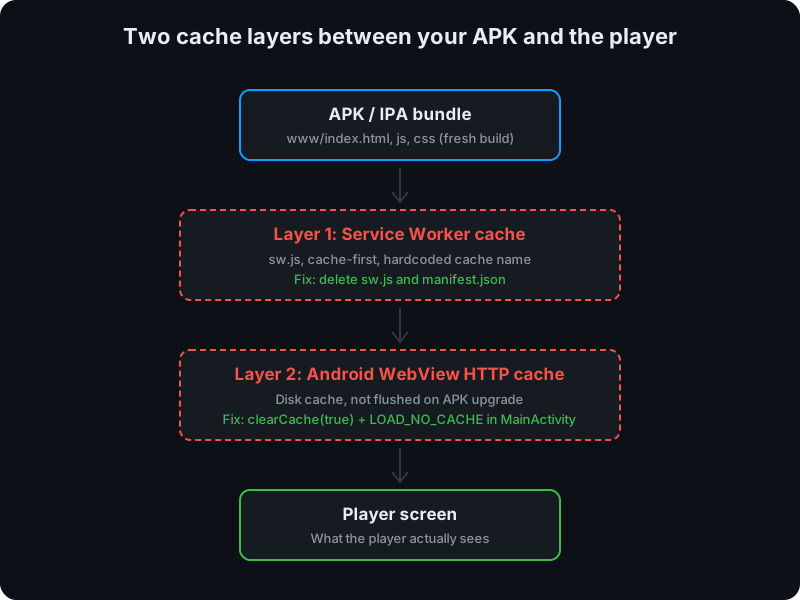
    A["Raw notes&lt;br/&gt;(articles, meeting&lt;br/&gt;transcripts, PDFs)"] --&gt;|ingest| B(("Claude Code"))
    B --&gt; C["Concept pages&lt;br/&gt;(processes, methods)"]
    B --&gt; D["Entity pages&lt;br/&gt;(teams, tools, roles)"]
    B --&gt; E["Source summaries"]
    C --&gt; F[["index.md&lt;br/&gt;+ activity log"]]
    D --&gt; F
    E --&gt; F
    F --&gt;|query| G["Cited answer"]
    F -.-&gt;|next ingest| B
    classDef hub fill:#cc785c,stroke:#cc785c,color:#0d1117,font-weight:700
    classDef page fill:#1c2128,stroke:#30363d,color:#e6edf3
    classDef raw fill:#21262d,stroke:#30363d,color:#8b949e
    class B hub
    class C,D,E,F page
    class A,G raw
</code></pre> <hr/> <h2 id="claude-code-as-the-interface-obsidian-as-the-map">Claude Code as the Interface, Obsidian as the Map</h2> <p>The day-to-day interface is Claude Code. Open the wiki repository in it and the whole thing behaves like a person who has read every page. Ask about the goals framework and it cites the relevant page. Paste a meeting note and say “ingest this” and it rewrites the three or four pages that actually need to change. Run a lint pass and it returns a checklist of contradictions and gaps. That is the part that is difficult to explain to anyone who has not tried it: the wiki stops feeling like documentation and starts feeling like a colleague with perfect recall of their own notes. Claude Code is remarkably good at this kind of work, and it is the first tool where a wiki has actually felt maintained instead of merely stored.</p> <p>Obsidian sits alongside as a reading surface. It lacks the live interaction of Claude Code, but it is an excellent IDE for a markdown knowledge base. The graph view exposes link structure at a glance, backlinks make navigation instant, and keyboard-driven browsing is fast. Claude Code is how the wiki is maintained and queried. Obsidian is how it is read and explored.</p> <hr/> <p>Documentation that regenerates itself is not a gimmick. It is the only kind that survives contact with a fast-moving engineering organization.</p>]]></content><author><name></name></author><category term="engineering-leadership"/><category term="engineering-leadership"/><category term="engineering-management"/><category term="llm"/><category term="claude-code"/><category term="onboarding"/><category term="knowledge-management"/><summary type="html"><![CDATA[How an engineering manager playbook stopped rotting once it became a living LLM-maintained wiki curated by Claude Code and inspired by Karpathy.]]></summary></entry><entry><title type="html">Cloudflare Pages: Deploy a Site for $10 a Year</title><link href="https://www.vchalyi.com/blog/2026/cloudflare-pages-deploy-site-for-10-dollars-a-year/" rel="alternate" type="text/html" title="Cloudflare Pages: Deploy a Site for $10 a Year"/><published>2026-04-14T09:00:00+00:00</published><updated>2026-04-14T09:00:00+00:00</updated><id>https://www.vchalyi.com/blog/2026/cloudflare-pages-deploy-site-for-10-dollars-a-year</id><content type="html" xml:base="https://www.vchalyi.com/blog/2026/cloudflare-pages-deploy-site-for-10-dollars-a-year/"><![CDATA[<p>Deploying <a href="https://meetingscost.com">meetingscost.com</a> cost me $10 for the year — that was the domain, and everything else (hosting, CDN, CI/CD, SSL, email routing) came free through Cloudflare.</p> <hr/> <h2 id="where-to-host-a-static-site-for-free-in-2026">Where to Host a Static Site for Free in 2026</h2> <p>The common options are GitHub Pages, Netlify free tier, and Vercel hobby plan. All three work for basic static sites. GitHub Pages is the simplest but has limited build flexibility beyond Jekyll. Netlify and Vercel both auto-deploy from GitHub and offer 100 GB/month bandwidth on their free tiers, but each has build minute caps and locks some useful features behind paid plans. Cloudflare Pages sits in the same category with a few meaningful differences: it runs on Cloudflare’s global edge network across 330+ cities, has no bandwidth limits on the free tier, and allows 500 builds per month with no compute time ceiling. For a static site or a Workers-based project, that is more headroom than most side projects will consume.</p> <hr/> <h2 id="why-cloudflare-pages-is-a-strong-free-hosting-choice">Why Cloudflare Pages Is a Strong Free Hosting Choice</h2> <p>The GitHub integration works without configuration. Connect a repo, set an optional build command, and every push to main triggers a deploy. For a plain HTML/CSS/JS site, there is no build command — just point Cloudflare at the directory containing your files. The <code class="language-plaintext highlighter-rouge">wrangler.jsonc</code> config for a static site is four lines:</p> <div class="language-json highlighter-rouge"><div class="highlight"><pre class="highlight"><code><span class="p">{</span><span class="w">
  </span><span class="nl">"name"</span><span class="p">:</span><span class="w"> </span><span class="s2">"my-site"</span><span class="p">,</span><span class="w">
  </span><span class="nl">"compatibility_date"</span><span class="p">:</span><span class="w"> </span><span class="s2">"2026-04-14"</span><span class="p">,</span><span class="w">
  </span><span class="nl">"assets"</span><span class="p">:</span><span class="w"> </span><span class="p">{</span><span class="w">
    </span><span class="nl">"directory"</span><span class="p">:</span><span class="w"> </span><span class="s2">"./"</span><span class="w">
  </span><span class="p">}</span><span class="w">
</span><span class="p">}</span><span class="w">
</span></code></pre></div></div> <p>Push that to GitHub, connect the repo in the Cloudflare Pages dashboard, and the site is live on a <code class="language-plaintext highlighter-rouge">*.pages.dev</code> subdomain in under a minute. No YAML pipeline files to write, no Docker images to configure. For anyone already using GitHub, this is zero additional tooling overhead.</p> <p>The edge delivery matters for user experience. Cloudflare Pages serves assets from the nearest of those 330+ locations globally. For a simple marketing site or a calculator tool, this means sub-100ms load times for most users without any CDN configuration or cache-warming.</p> <figure> <picture> <source class="responsive-img-srcset" srcset="/assets/img/blog/cloudflare-pages-deploy-site-for-10-dollars-a-year-fig1-480.webp 480w,/assets/img/blog/cloudflare-pages-deploy-site-for-10-dollars-a-year-fig1-800.webp 800w,/assets/img/blog/cloudflare-pages-deploy-site-for-10-dollars-a-year-fig1-1400.webp 1400w," type="image/webp" sizes="95vw"/> <img src="/assets/img/blog/cloudflare-pages-deploy-site-for-10-dollars-a-year-fig1.png" class="img-fluid rounded z-depth-1" width="100%" height="auto" alt="Cloudflare Workers and Pages dashboard showing the meeting-cost project connected to the kvantatech/simple-sites GitHub repository" loading="eager" onerror="this.onerror=null; $('.responsive-img-srcset').remove();"/> </picture> </figure> <hr/> <h2 id="cloudflare-as-your-domain-registrar">Cloudflare as Your Domain Registrar</h2> <p>Most domain registrars sell at cost and recover margin through renewal price increases, add-ons, and aggressive upsells at checkout. Cloudflare Registrar sells domains at ICANN wholesale price with no markup. A <code class="language-plaintext highlighter-rouge">.com</code> domain runs about $10.44 per year, and that price stays flat at renewal. WHOIS privacy is included by default — no separate fee.</p> <p>The operational benefit is having DNS, hosting, and the domain in one dashboard. Connecting a custom domain to a Pages project takes two steps: add the domain in the Pages project settings, update your nameservers to point to Cloudflare. After that, DNS propagation and SSL provisioning happen automatically. No manual A records to wire up, no waiting for certificate issuance.</p> <hr/> <h2 id="free-features-that-make-a-difference">Free Features That Make a Difference</h2> <p>Two Cloudflare features that look small but are genuinely useful in practice:</p> <p><strong>Redirect rules.</strong> Setting up a redirect from <code class="language-plaintext highlighter-rouge">www.yourdomain.com</code> to the apex domain (or the reverse) is a single rule in the Cloudflare dashboard. No nginx config, no serverless function, no extra DNS entries. The rule propagates globally in seconds.</p> <p><strong>Email Routing.</strong> Registering a domain through Cloudflare includes email routing at no cost. You can create a custom address like <code class="language-plaintext highlighter-rouge">contact@yourdomain.com</code> that forwards to any personal inbox. This is useful for side projects that need a professional contact point without paying for Google Workspace or similar. When I set up a Google Play developer account for an LLC, a custom domain email was required as the public business contact. Cloudflare Email Routing handled that with a few clicks and no additional cost. I documented that full process in <a href="https://www.vchalyi.com/blog/2026/how-to-register-google-play-developer-account-for-llc/">How to Register a Google Play Developer Account for Your LLC</a>.</p> <figure> <picture> <source class="responsive-img-srcset" srcset="/assets/img/blog/cloudflare-pages-deploy-site-for-10-dollars-a-year-fig2-480.webp 480w,/assets/img/blog/cloudflare-pages-deploy-site-for-10-dollars-a-year-fig2-800.webp 800w,/assets/img/blog/cloudflare-pages-deploy-site-for-10-dollars-a-year-fig2-1400.webp 1400w," type="image/webp" sizes="95vw"/> <img src="/assets/img/blog/cloudflare-pages-deploy-site-for-10-dollars-a-year-fig2.png" class="img-fluid rounded z-depth-1" width="100%" height="auto" alt="Cloudflare Email Routing rules showing about@meetingscost.com forwarding to a personal email address" loading="eager" onerror="this.onerror=null; $('.responsive-img-srcset').remove();"/> </picture> </figure> <hr/> <h2 id="what-else-cloudflare-gives-you-on-the-free-tier">What Else Cloudflare Gives You on the Free Tier</h2> <p>A few more capabilities worth knowing before reaching for a paid alternative:</p> <ul> <li><strong>Web Analytics.</strong> Privacy-first, cookie-free, no GDPR banner required. Shows page views, referrers, and top countries. Accurate enough for a side project without any third-party tracking scripts.</li> <li><strong>DDoS protection.</strong> Always on at L3/L4, no configuration required. Your site gets it by default.</li> <li><strong>SSL/TLS.</strong> Auto-provisioned and auto-renewed. No Certbot, no Let’s Encrypt setup, no renewal reminders.</li> <li><strong>Firewall rules.</strong> The free tier includes custom firewall rules — enough to block specific countries, rate-limit aggressive bots, or challenge suspicious traffic patterns.</li> <li><strong>R2 object storage.</strong> 10 GB free with zero egress fees. If a project needs to serve user-uploaded content or large assets, R2 is cheaper than S3 for anything with significant read traffic, since you pay only for storage and writes, not downloads.</li> </ul> <hr/> <p>For a side project or micro-site, the total annual cost is the domain. The hosting, the CDN, the CI/CD pipeline, the SSL certificate, and the email address all run on Cloudflare’s free tier without modification or workarounds.</p>]]></content><author><name></name></author><category term="platform"/><category term="cloudflare"/><category term="cloudflare-pages"/><category term="web-hosting"/><category term="static-site"/><category term="devops"/><summary type="html"><![CDATA[Cloudflare Pages gives you free hosting with GitHub CI/CD. Add a .com domain for $10/year and get email forwarding, analytics, and DDoS protection for free.]]></summary></entry><entry><title type="html">Capacitor WebView Cache: Why New Builds Show Old Assets</title><link href="https://www.vchalyi.com/blog/2026/capacitor-webview-cache-stale-assets/" rel="alternate" type="text/html" title="Capacitor WebView Cache: Why New Builds Show Old Assets"/><published>2026-04-11T09:00:00+00:00</published><updated>2026-04-11T09:00:00+00:00</updated><id>https://www.vchalyi.com/blog/2026/capacitor-webview-cache-stale-assets</id><content type="html" xml:base="https://www.vchalyi.com/blog/2026/capacitor-webview-cache-stale-assets/"><![CDATA[<p>A Capacitor WebView cache bug in our runner game kept shipping old JavaScript to players after every update, even though the new APK installed cleanly. Two stacked cache layers had to be torn out before a fresh build actually reached the screen.</p> <hr/> <h2 id="how-capacitor-wraps-a-web-game-in-a-native-shell">How Capacitor Wraps a Web Game in a Native Shell</h2> <p>Capacitor is Ionic’s successor to Cordova: a thin native runtime that hosts your HTML, CSS, and JavaScript inside a platform WebView and exposes native APIs through a JavaScript bridge. On Android, your <code class="language-plaintext highlighter-rouge">www/</code> folder is bundled straight into the APK and served by the system WebView, which is Chromium on any modern device. On iOS, the same bundle runs inside WKWebView. One codebase, two native shells, and near-native input latency for a canvas-based game like ours, a mobile runner called Road Rage that my friend started building and I joined a few weeks in.</p> <p>The architecture looks like this:</p> <figure> <picture> <source class="responsive-img-srcset" srcset="/assets/img/blog/capacitor-webview-cache-stale-assets-architecture.svg" sizes="95vw"/> <img src="/assets/img/blog/capacitor-webview-cache-stale-assets-architecture.svg" class="img-fluid rounded z-depth-1" width="100%" height="auto" alt="Capacitor architecture: Android APK or iOS IPA hosts a Native Activity or ViewController, which runs the Capacitor Bridge, which in turn drives the system WebView serving the www bundle and also routes calls to native plugins" loading="eager" onerror="this.onerror=null; $('.responsive-img-srcset').remove();"/> </picture> </figure> <p>The WebView is the whole runtime. Everything the player sees is HTML rendered inside that container, and every native capability reaches the game through the bridge. Which is exactly why the WebView’s caching behavior became load-bearing for us.</p> <hr/> <h2 id="the-bug-new-build-installs-old-game-loads">The Bug: New Build Installs, Old Game Loads</h2> <p>We ship internal builds through Firebase App Distribution. The flow is normal: bump the version, run <code class="language-plaintext highlighter-rouge">npx cap sync</code>, assemble the APK, upload, testers tap Update. The APK installs fine, the version label on the main menu shows the new number, then the game boots into a visibly older UI. The worst symptom was mixed-version state: a new <code class="language-plaintext highlighter-rouge">index.html</code> loading against stale <code class="language-plaintext highlighter-rouge">game.js</code> and <code class="language-plaintext highlighter-rouge">styles.css</code> from the previous install. On a Pixel 5 this silently broke the ×2 coins button because the event handler it needed lived in the new JS bundle, but the markup was rendering against the old one.</p> <p>“Clear app storage” fixed it every time, which was the giveaway. The bytes inside the APK were correct. Something between the APK and the screen was holding onto the previous build’s files.</p> <hr/> <h2 id="two-cache-layers-between-your-code-and-the-player">Two Cache Layers Between Your Code and the Player</h2> <p>A Capacitor Android app can cache assets in two independent places, and both have to be right for an update to stick:</p> <ul> <li><strong>Service Worker cache.</strong> A legacy PWA service worker (<code class="language-plaintext highlighter-rouge">sw.js</code>) from the early web prototype was still registered, using a cache-first strategy keyed on a hardcoded cache name. Because the cache name never changed, every boot read <code class="language-plaintext highlighter-rouge">index.html</code> and friends from IndexedDB instead of from the APK. New builds were invisible to the app until someone wiped storage.</li> <li><strong>Android WebView HTTP cache.</strong> Even after removing the service worker, Android’s system WebView keeps its own disk-backed HTTP cache for files it has loaded before. That cache is not flushed when the APK is upgraded, so assets that matched the previous install’s URLs kept serving from WebView storage in preference to the fresh copies packaged inside the new APK.</li> </ul> <figure> <picture> <source class="responsive-img-srcset" srcset="/assets/img/blog/capacitor-webview-cache-stale-assets-layers.svg" sizes="95vw"/> <img src="/assets/img/blog/capacitor-webview-cache-stale-assets-layers.svg" class="img-fluid rounded z-depth-1" width="100%" height="auto" alt="Two cache layers stacked between a Capacitor APK and the player: service worker cache and Android WebView HTTP cache" loading="eager" onerror="this.onerror=null; $('.responsive-img-srcset').remove();"/> </picture> </figure> <p>The two layers produce the same external symptom, which is why the first fix looked complete and wasn’t. You end up debugging the wrong layer twice.</p> <hr/> <h2 id="the-fix-remove-one-cache-disable-the-other">The Fix: Remove One Cache, Disable the Other</h2> <p>The first commit ripped out the service worker and the PWA manifest entirely. Capacitor already serves <code class="language-plaintext highlighter-rouge">www/</code> directly from packaged assets, so a service worker sitting on top of that was redundant and strictly harmful. Six files deleted, one cache layer gone, problem apparently solved. It wasn’t.</p> <p>The second commit reached into <code class="language-plaintext highlighter-rouge">MainActivity.java</code> and did two things on every startup:</p> <div class="language-java highlighter-rouge"><div class="highlight"><pre class="highlight"><code><span class="nc">WebView</span> <span class="n">webView</span> <span class="o">=</span> <span class="k">this</span><span class="o">.</span><span class="na">bridge</span><span class="o">.</span><span class="na">getWebView</span><span class="o">();</span>
<span class="k">if</span> <span class="o">(</span><span class="n">webView</span> <span class="o">!=</span> <span class="kc">null</span><span class="o">)</span> <span class="o">{</span>
    <span class="n">webView</span><span class="o">.</span><span class="na">clearCache</span><span class="o">(</span><span class="kc">true</span><span class="o">);</span>
    <span class="n">webView</span><span class="o">.</span><span class="na">getSettings</span><span class="o">().</span><span class="na">setCacheMode</span><span class="o">(</span><span class="nc">WebSettings</span><span class="o">.</span><span class="na">LOAD_NO_CACHE</span><span class="o">);</span>
<span class="o">}</span>
</code></pre></div></div> <p><code class="language-plaintext highlighter-rouge">clearCache(true)</code> flushes any HTTP cache left over from the previous install, and <code class="language-plaintext highlighter-rouge">LOAD_NO_CACHE</code> tells the WebView to skip its disk cache on subsequent loads. There is no performance penalty, because Capacitor reads <code class="language-plaintext highlighter-rouge">www/</code> straight from the APK’s packaged assets, not over HTTP. The moment this landed, Firebase App Distribution updates started reaching players cleanly and the ×2 coins button came back to life.</p> <hr/> <p>Cross-platform hybrid stacks like Capacitor and Cordova are built on a compromise: one web codebase, two native hosts. That compromise is mostly invisible, until a caching layer you forgot about starts serving yesterday’s build. The rule we now enforce in this codebase is simple: on a native host, the WebView must never cache code it reads from packaged assets.</p>]]></content><author><name></name></author><category term="mobile-development"/><category term="capacitor"/><category term="webview"/><category term="android-development"/><category term="mobile-games"/><category term="cross-platform"/><category term="hybrid-apps"/><summary type="html"><![CDATA[How two hidden cache layers in a Capacitor Android app served stale HTML, CSS, and JS after every update, and the WebView cache fix that solved it.]]></summary></entry><entry><title type="html">How to Register a Google Play Developer Account for Your LLC: A Step-by-Step Guide</title><link href="https://www.vchalyi.com/blog/2026/how-to-register-google-play-developer-account-for-llc/" rel="alternate" type="text/html" title="How to Register a Google Play Developer Account for Your LLC: A Step-by-Step Guide"/><published>2026-04-08T16:00:00+00:00</published><updated>2026-04-08T16:00:00+00:00</updated><id>https://www.vchalyi.com/blog/2026/how-to-register-google-play-developer-account-for-llc</id><content type="html" xml:base="https://www.vchalyi.com/blog/2026/how-to-register-google-play-developer-account-for-llc/"><![CDATA[<p>Registering a Google Play Developer account for an LLC is not as straightforward as you might expect. Unlike a personal developer account, an organization account requires a DUNS number, a company website, a public email, and a public phone number. Some of these are not intuitive to obtain, and the process has a few surprises along the way.</p> <p>The good news: with the right preparation, you can get through the entire process in about <strong>4 days</strong>. Here is exactly how I did it.</p> <h2 id="what-you-need-before-you-start">What You Need Before You Start</h2> <p>Before diving into the steps, here is the full list of what Google requires for an organization account:</p> <ul> <li>A <strong>DUNS number</strong> for your LLC</li> <li>A <strong>company website</strong> verified through Google Search Console</li> <li>A <strong>public contact email</strong> on a custom domain</li> <li>A <strong>public phone number</strong> for your developer page</li> <li>A <strong>Google account</strong> to use as the developer account</li> <li><strong>$25</strong> for the one-time registration fee</li> </ul> <p>I recommend reading through all the steps first so you can kick off parallel tasks (like requesting your DUNS number while setting up your website).</p> <h2 id="step-1-get-your-duns-number">Step 1: Get Your DUNS Number</h2> <p>A DUNS (Data Universal Numbering System) number is a unique nine-digit identifier issued by Dun &amp; Bradstreet. Google requires it to verify your organization’s identity.</p> <h3 id="how-to-apply">How to apply</h3> <p>Go to the <a href="https://www.dnb.com/duns/get-a-duns.html">Dun &amp; Bradstreet website</a> and request a DUNS number for your LLC. The official timeline says it can take <strong>up to 30 days</strong>, but in my case it took only <strong>2 days</strong> to receive the number via email.</p> <h3 id="the-catch-nobody-warns-you-about">The catch nobody warns you about</h3> <p>Here is where it gets interesting. I received my DUNS number by email and immediately tried to use it when setting up my Google Play Developer account. Google could not find my organization by the DUNS number. After contacting support, they explained that since the number was brand new, it had not yet propagated through their systems. They asked me to <strong>wait up to 48 hours</strong>.</p> <p>So the natural question is: why send me the number if I cannot use it yet? It would have been much more helpful to simply delay the email until the number is actually active. But that is how it works, so plan for an extra day of waiting.</p> <h2 id="step-2-set-up-a-company-website">Step 2: Set Up a Company Website</h2> <p>Google requires your organization to have a website, and you will need to verify ownership through <strong>Google Search Console</strong>. This is used to confirm that the website belongs to your LLC.</p> <p>Thanks to AI tools, building a simple company website is surprisingly fast. You can put together a clean, professional-looking site in about an hour. I used <strong>Cloudflare Pages</strong> for hosting, which is completely free. Just push your site to a Git repository, connect it to Cloudflare Pages, and it deploys automatically.</p> <h3 id="website-verification">Website verification</h3> <p>Once your site is live:</p> <ol> <li>Go to <a href="https://search.google.com/search-console">Google Search Console</a></li> <li>Add your domain as a property</li> <li>Follow the verification steps (usually adding a DNS TXT record)</li> </ol> <p>If you are already using Cloudflare for DNS, adding the verification record takes less than a minute.</p> <h2 id="step-3-set-up-a-business-email">Step 3: Set Up a Business Email</h2> <p>Google Play requires a contact email address that will be publicly displayed on your developer page. Using a personal Gmail address does not look professional for a business, so you will want an email on your company domain (e.g., <code class="language-plaintext highlighter-rouge">contact@yourcompany.com</code>).</p> <p><strong>Cloudflare Email Routing</strong> makes this completely free. Here is how it works:</p> <ol> <li>Go to your domain in the Cloudflare dashboard</li> <li>Navigate to <strong>Email &gt; Email Routing</strong></li> <li>Set up a routing rule to forward emails from your custom domain to your personal Gmail</li> </ol> <p>That is it. Emails sent to <code class="language-plaintext highlighter-rouge">contact@yourcompany.com</code> will arrive in your Gmail inbox. No need to pay for Google Workspace or any other email hosting service.</p> <p>Kudos to Cloudflare here. Between domain registration, DNS, email routing, and website hosting, they offer an impressive amount for free.</p> <h2 id="step-4-get-a-developer-phone-number">Step 4: Get a Developer Phone Number</h2> <p>Google requires a phone number that will be <strong>publicly visible</strong> on your Google Play developer page. This is a legitimate privacy concern. You probably do not want your personal cell phone number exposed to every user who visits your app listing.</p> <p>The solution: <strong>Google Voice</strong>. If you already have a phone number, you can get a Google Voice number for free. It gives you a separate number that forwards calls and texts to your real phone, keeping your personal number private.</p> <h3 id="setting-up-google-voice">Setting up Google Voice</h3> <ol> <li>Go to <a href="https://voice.google.com">voice.google.com</a></li> <li>Choose a phone number (you can pick your area code)</li> <li>Link it to your existing phone number</li> <li>Use this number as your developer contact number</li> </ol> <p>The whole setup takes about 10 minutes.</p> <h2 id="step-5-complete-the-google-play-console-registration">Step 5: Complete the Google Play Console Registration</h2> <p>With all the prerequisites in place, you can now finish the registration:</p> <ol> <li>Go to <a href="https://play.google.com/console/signup">Google Play Console</a></li> <li>Sign in with the Google account you want to use as the developer account</li> <li>Select <strong>Organization</strong> as the account type</li> <li>Enter your organization details: <ul> <li>Legal business name (must match your LLC registration)</li> <li>DUNS number</li> <li>Business address</li> <li>Contact information</li> </ul> </li> <li>Pay the <strong>$25 one-time registration fee</strong></li> <li>Verify your <strong>website</strong> through Google Search Console (if not done already)</li> <li>Provide your <strong>contact email</strong> and <strong>phone number</strong></li> <li>Complete <strong>identity verification</strong> (Google may request additional documents)</li> <li>Accept the <strong>Google Play Developer Distribution Agreement</strong></li> </ol> <p>After submitting, Google reviews your application. Approval can take a few days, but in many cases it is processed within 24-48 hours.</p> <h2 id="timeline-breakdown">Timeline Breakdown</h2> <p>Here is how long the entire process took in my experience:</p> <table> <thead> <tr> <th>Day</th> <th>Task</th> <th>Details</th> </tr> </thead> <tbody> <tr> <td>Day 1-2</td> <td>DUNS number</td> <td>Applied and received the number via email</td> </tr> <tr> <td>Day 3</td> <td>DUNS propagation + parallel setup</td> <td>Waited for the DUNS number to become findable. Used this time to set up Google Voice, build the company website, and configure email routing</td> </tr> <tr> <td>Day 4</td> <td>Registration</td> <td>Completed the Google Play Console setup</td> </tr> </tbody> </table> <p><strong>Total: approximately 4 days</strong> from start to a submitted application.</p> <p>The biggest time sink is the DUNS number. If you are planning to publish an app, request your DUNS number first and work on everything else while you wait.</p> <h2 id="final-thoughts">Final Thoughts</h2> <p>The process of registering a Google Play Developer account for an LLC is more involved than it needs to be. The DUNS number requirement adds days of waiting, and the public phone number requirement raises privacy concerns that Google does not address.</p> <p>That said, with tools like <strong>Cloudflare</strong> (free domain, hosting, and email routing) and <strong>Google Voice</strong> (free private phone number), you can get through the process without spending anything beyond the $25 registration fee. Start with the DUNS number, set up everything else in parallel, and you will be ready to publish your first app in under a week.</p>]]></content><author><name></name></author><category term="how-to"/><category term="google-play"/><category term="android"/><category term="llc"/><category term="duns-number"/><category term="app-publishing"/><category term="mobile-development"/><summary type="html"><![CDATA[A practical guide to setting up a Google Play Developer account for an LLC, covering DUNS numbers, website setup, business email, and privacy tips. Based on real experience.]]></summary></entry><entry><title type="html">Claude Code Best Practices: How I Use AI to Build Faster and Smarter</title><link href="https://www.vchalyi.com/blog/2026/claude-code-best-practices/" rel="alternate" type="text/html" title="Claude Code Best Practices: How I Use AI to Build Faster and Smarter"/><published>2026-03-20T09:00:00+00:00</published><updated>2026-03-20T09:00:00+00:00</updated><id>https://www.vchalyi.com/blog/2026/claude-code-best-practices</id><content type="html" xml:base="https://www.vchalyi.com/blog/2026/claude-code-best-practices/"><![CDATA[<p>I’ve been using Claude Code daily. Here’s what actually moved the needle:</p> <hr/> <h2 id="1-never-touch-files-manually-teach-the-ai-instead">1. Never Touch Files Manually, Teach the AI Instead</h2> <p>When I discover how something works, I ask Claude to save it to memory. Next session, it already knows my architecture, conventions, and edge cases. Every manual edit is a missed opportunity to build knowledge that compounds across sessions.</p> <hr/> <h2 id="2-create-skills-for-repetitive-workflows">2. Create Skills for Repetitive Workflows</h2> <p>Lint, test, build, commit, push, open a PR - one command. No context-switching, no remembering flags. And when something fails, the AI handles it intelligently instead of just bailing.</p> <hr/> <h2 id="3-start-every-feature-with-a-written-prd">3. Start Every Feature with a Written PRD</h2> <p>Before any code, I switch to planning mode. Claude explores the codebase, designs the approach, writes a PRD. I review, adjust, then execute. Features land cleaner, rework drops, and I have a folder of dated docs capturing every architectural decision.</p> <hr/> <h2 id="4-be-selective-with-mcp-servers">4. Be Selective with MCP Servers</h2> <p>Every MCP server you add registers its tools into the context window. Too many servers pollute the context and exhaust it much faster, leaving less room for the actual work. I keep only the servers I use regularly and disable the rest. Lean context = better focus and longer productive sessions.</p> <hr/> <h2 id="5-enforce-tdd">5. Enforce TDD</h2> <p>In my <code class="language-plaintext highlighter-rouge">CLAUDE.md</code>, I instruct Claude Code to always start with tests first for every new feature: write the tests, confirm they fail, implement the feature, confirm the tests go green. The rule is absolute: <strong>never fix tests just to make them pass</strong>. This keeps the test suite honest and forces real solutions instead of workarounds.</p> <hr/> <p>Treat AI as a long-term collaborator, not a one-shot autocomplete. Build memory. Build automation. Build process. The developers who will thrive aren’t the ones who prompt the hardest — they’re the ones who build systems around their AI tools that compound over time.</p>]]></content><author><name></name></author><category term="ai"/><category term="llm"/><category term="claude-code"/><category term="ai"/><category term="developer-productivity"/><category term="anthropic"/><category term="coding-with-ai"/><summary type="html"><![CDATA[Practical Claude Code best practices that compound over time — from persistent memory and custom skills to PRDs, TDD workflows, and MCP server hygiene.]]></summary></entry><entry><title type="html">Run Hugging Face LLMs Free on Google Colab</title><link href="https://www.vchalyi.com/blog/2025/google-colab-and-huggingface/" rel="alternate" type="text/html" title="Run Hugging Face LLMs Free on Google Colab"/><published>2025-11-11T17:00:00+00:00</published><updated>2025-11-11T17:00:00+00:00</updated><id>https://www.vchalyi.com/blog/2025/google-colab-and-huggingface</id><content type="html" xml:base="https://www.vchalyi.com/blog/2025/google-colab-and-huggingface/"><![CDATA[<h2 id="running-llms-from-hugging-face-hub-for-free-on-google-colab">Running LLMs from Hugging Face Hub for Free on Google Colab</h2> <p>If you’ve ever wanted to experiment with large language models but lacked the hardware, here’s the good news: you can run Hugging Face models directly in Google Colab, taking advantage of free T4 GPUs.</p> <p>Here’s the setup in a nutshell:</p> <ol> <li>Open a Colab notebook and select GPU (T4).</li> <li>Obtain a token from Hugging Face Hub (for accessing models).</li> <li>Use transformers library to load a model via the Hugging Face Hub.</li> <li>Run inference locally in Colab. No paid API or hosting required!</li> </ol> <h2 id="hugging-face-can-feel-overwhelming-at-first">Hugging Face Can Feel Overwhelming at First</h2> <p>If you’re new to Hugging Face, it’s easy to get lost in its rich ecosystem: transformers, datasets, inference, and more. Each library plays a different role, and understanding how they connect can take a bit of time.</p> <p>A key distinction many newcomers miss is how and where your model actually runs and that’s where the difference between pipeline and InferenceClient becomes important:</p> <ul> <li>pipeline. Downloads the model weights and runs it locally (on your Colab T4 or your own GPU). Great for learning, experimentation, and custom workflows. <div class="language-python highlighter-rouge"><div class="highlight"><pre class="highlight"><code><span class="kn">from</span> <span class="n">transformers</span> <span class="kn">import</span> <span class="n">pipeline</span>
<span class="n">pipe</span> <span class="o">=</span> <span class="nf">pipeline</span><span class="p">(</span><span class="sh">"</span><span class="s">text-generation</span><span class="sh">"</span><span class="p">,</span> <span class="n">model</span><span class="o">=</span><span class="sh">"</span><span class="s">mistralai/Mistral-7B-Instruct-v0.2</span><span class="sh">"</span><span class="p">)</span>
<span class="n">result</span> <span class="o">=</span> <span class="nf">pipe</span><span class="p">(</span><span class="sh">"</span><span class="s">Explain quantum computing in simple terms:</span><span class="sh">"</span><span class="p">)</span>
<span class="nf">print</span><span class="p">(</span><span class="n">result</span><span class="p">)</span>
</code></pre></div> </div> </li> <li>InferenceClient. Sends your request to the Hugging Face Inference API, where the model runs remotely on one of their AI infrastructure providers.You don’t need to manage hardware. The compute is handled entirely by Hugging Face and their partners.</li> </ul> <div class="language-python highlighter-rouge"><div class="highlight"><pre class="highlight"><code><span class="kn">from</span> <span class="n">huggingface_hub</span> <span class="kn">import</span> <span class="n">InferenceClient</span>
<span class="kn">from</span> <span class="n">dotenv</span> <span class="kn">import</span> <span class="n">load_dotenv</span>
<span class="nf">load_dotenv</span><span class="p">()</span>
<span class="n">hf_token</span> <span class="o">=</span> <span class="n">os</span><span class="p">.</span><span class="nf">getenv</span><span class="p">(</span><span class="sh">"</span><span class="s">HF_TOKEN</span><span class="sh">"</span><span class="p">)</span>
    
<span class="n">client</span> <span class="o">=</span> <span class="nc">InferenceClient</span><span class="p">(</span><span class="n">token</span><span class="o">=</span><span class="n">hf_token</span><span class="p">)</span>
<span class="n">resp</span> <span class="o">=</span> <span class="n">client</span><span class="p">.</span><span class="nf">text_generation</span><span class="p">(</span>
    <span class="n">prompt</span><span class="o">=</span><span class="sh">'</span><span class="s">Tell me a math joke</span><span class="sh">'</span><span class="p">,</span> 
    <span class="n">model</span><span class="o">=</span><span class="sh">"</span><span class="s">meta-llama/Llama-3.1-8B-Instruct</span><span class="sh">"</span><span class="p">,</span>
    <span class="n">max_new_tokens</span><span class="o">=</span><span class="mi">100</span><span class="p">,</span>  <span class="c1"># Generate up to 100 new tokens
</span>    <span class="n">temperature</span><span class="o">=</span><span class="mf">0.7</span><span class="p">,</span>     <span class="c1"># Add some randomness
</span>    <span class="n">do_sample</span><span class="o">=</span><span class="bp">True</span>       <span class="c1"># Enable sampling for more creative responses
</span><span class="p">)</span>
<span class="nf">print</span><span class="p">(</span><span class="n">resp</span><span class="p">)</span>
</code></pre></div></div>]]></content><author><name></name></author><category term="how-to"/><category term="llm"/><category term="huggingface"/><category term="google-colab"/><category term="ai"/><category term="ml"/><category term="machine-learning"/><summary type="html"><![CDATA[Run large language models (LLMs) from Hugging Face Hub for free using Google Colab's T4 GPUs. It covers setup, authentication, and explains the key differences between pipeline and InferenceClient for local vs remote model execution.]]></summary></entry><entry><title type="html">LLM Performance on Mac: Native vs Docker Ollama Benchmark</title><link href="https://www.vchalyi.com/blog/2025/ollama-performance-benchmark-macos/" rel="alternate" type="text/html" title="LLM Performance on Mac: Native vs Docker Ollama Benchmark"/><published>2025-06-25T17:00:00+00:00</published><updated>2025-06-25T17:00:00+00:00</updated><id>https://www.vchalyi.com/blog/2025/ollama-performance-benchmark-macos</id><content type="html" xml:base="https://www.vchalyi.com/blog/2025/ollama-performance-benchmark-macos/"><![CDATA[<h2 id="llm-runs-slow-in-docker-on-macos">LLM runs slow in Docker on MacOS</h2> <p>I have started generating a daily RSS digest using Matcha and summarizing it with Ollama. You can find more details in <a href="/blog/2025/summarize-rss-feed-with-ollama/">my previous article</a>. However, when there are many articles to summarize, the process becomes quite slow. For example, once I had to wait almost one hour to get the daily digest. This made me think about how to make it faster. My first guess was that the GPU is not being used at all. I found <a href="https://github.com/ollama/ollama/issues/3849#issuecomment-2075359242">evidence</a> for this in the Ollama GitHub repository:</p> <blockquote> <p>When you run Ollama as a native Mac application on M1 (or newer) hardware, we run the LLM on the GPU.</p> <p>Docker Desktop on Mac, does NOT expose the Apple GPU to the container runtime, it only exposes an ARM CPU (or virtual x86 CPU via Rosetta emulation) so when you run Ollama inside that container, it is running purely on CPU, not utilizing your GPU hardware.</p> <p>On PC’s NVIDIA and AMD have support for GPU pass-through into containers, so it is possible for ollama in a container to access the GPU, but this is not possible on Apple hardware.</p> </blockquote> <p>So let’s install ollama natively on MacOS and run a benchmark to compare the results.</p> <h2 id="run-llm-natively-on-macos">Run LLM natively on MacOS</h2> <ul> <li>Install ollama <div class="language-sh highlighter-rouge"><div class="highlight"><pre class="highlight"><code>brew <span class="nb">install </span>ollama
</code></pre></div> </div> </li> <li>Start ollama <div class="language-sh highlighter-rouge"><div class="highlight"><pre class="highlight"><code>ollama serve
</code></pre></div> </div> </li> <li>Make sure ollama is up and running <div class="language-sh highlighter-rouge"><div class="highlight"><pre class="highlight"><code>curl http://localhost:11434
</code></pre></div> </div> </li> <li>Pull a model (e.g. granite3.3 by IBM) <div class="language-sh highlighter-rouge"><div class="highlight"><pre class="highlight"><code>ollama pull granite3.3:latest
</code></pre></div> </div> </li> <li>Run a model <div class="language-sh highlighter-rouge"><div class="highlight"><pre class="highlight"><code>ollama run granite3.3:latest
</code></pre></div> </div> </li> <li>Adding a flag <code class="language-plaintext highlighter-rouge">--verbose</code> gives you helpful infromation about the performance <div class="language-sh highlighter-rouge"><div class="highlight"><pre class="highlight"><code>ollama run granite3.3:latest <span class="nt">--verbose</span>
</code></pre></div> </div> </li> </ul> <figure> <picture> <source class="responsive-img-srcset" srcset="/assets/img/blog/20250626/ollama-granite-local-run-480.webp 480w,/assets/img/blog/20250626/ollama-granite-local-run-800.webp 800w,/assets/img/blog/20250626/ollama-granite-local-run-1400.webp 1400w," type="image/webp" sizes="95vw"/> <img src="/assets/img/blog/20250626/ollama-granite-local-run.png" class="img-fluid rounded z-depth-1" width="100%" height="auto" data-zoomable="" loading="eager" onerror="this.onerror=null; $('.responsive-img-srcset').remove();"/> </picture> </figure> <h2 id="run-a-benchmark">Run a benchmark</h2> <p>We live in remarkable times. Whenever I face a challenge, I first search online, as there is a high chance that someone else has already encountered and solved a similar problem. I was curious if there was a benchmarking tool for LLMs that I could use, and I discovered <a href="https://llm.aidatatools.com/">llm.aidatatools.com</a>.</p> <p>Install:</p> <div class="language-sh highlighter-rouge"><div class="highlight"><pre class="highlight"><code>pip <span class="nb">install </span>llm-benchmark
</code></pre></div></div> <p>Setup:</p> <div class="language-sh highlighter-rouge"><div class="highlight"><pre class="highlight"><code>Total memory size : 32.00 GB
cpu_info: Apple M1 Pro
gpu_info: Apple M1 Pro
os_version: macOS 14.6 <span class="o">(</span>23G80<span class="o">)</span>
ollama_version: 0.9.1
</code></pre></div></div> <p>It can automatically pick and pull models based on RAM available on your machine but you also can create a config file with models you’d like to test:</p> <div class="language-yaml highlighter-rouge"><div class="highlight"><pre class="highlight"><code><span class="na">file_name</span><span class="pi">:</span> <span class="s2">"</span><span class="s">custombenchmarkmodels.yml"</span>
<span class="na">version</span><span class="pi">:</span> <span class="s">2.0.custom</span>
<span class="na">models</span><span class="pi">:</span>
  <span class="pi">-</span> <span class="na">model</span><span class="pi">:</span> <span class="s2">"</span><span class="s">granite3.3:8b"</span>
  <span class="pi">-</span> <span class="na">model</span><span class="pi">:</span> <span class="s2">"</span><span class="s">phi4:14b"</span>
  <span class="pi">-</span> <span class="na">model</span><span class="pi">:</span> <span class="s2">"</span><span class="s">deepseek-r1:14b"</span>
</code></pre></div></div> <p>Now you can run the benchmark with the models of your choice:</p> <div class="language-sh highlighter-rouge"><div class="highlight"><pre class="highlight"><code>llm_benchmark run <span class="nt">--custombenchmark</span><span class="o">=</span>path/to/custombenchmarkmodels.yml
</code></pre></div></div> <p>Here is a sample of what a benchmark looks like:</p> <div class="language-plaintext highlighter-rouge"><div class="highlight"><pre class="highlight"><code>model_name =    granite3.3:8b
prompt = Summarize the key differences between classical and operant conditioning in psychology.
eval rate:            24.49 tokens/s
prompt = Translate the following English paragraph into Chinese and elaborate more -&gt; Artificial intelligence is transforming various industries by enhancing efficiency and enabling new capabilities.
eval rate:            24.93 tokens/s
prompt = What are the main causes of the American Civil War?
eval rate:            24.00 tokens/s
prompt = How does photosynthesis contribute to the carbon cycle?
eval rate:            24.14 tokens/s
prompt = Develop a python function that solves the following problem, sudoku game.
eval rate:            23.93 tokens/s
--------------------
Average of eval rate:  24.298  tokens/s
</code></pre></div></div> <p>During the native run, GPU utilization was consistently close to 100%, confirming that Ollama was able to leverage the Apple M1 Pro’s GPU for accelerated inference.</p> <p>The same benchmark was performed with Ollama running inside a Docker container, where GPU usage was not detected. As expected, the evaluation rates were significantly lower, and the models relied solely on CPU resources, resulting in much slower inference times.</p> <h2 id="benchmark-results">Benchmark results</h2> <p>The results of benchmarking for ollama running natively and in a docker container:</p> <table> <thead> <tr> <th style="text-align: left">Model</th> <th style="text-align: center">Avg. Eval Rate (tokens/s)</th> <th style="text-align: center">GPU Utilization</th> <th style="text-align: left">Notes</th> </tr> </thead> <tbody> <tr> <td style="text-align: left">granite3.3:8b</td> <td style="text-align: center">24.3</td> <td style="text-align: center">~100%</td> <td style="text-align: left">Native, Apple M1 Pro</td> </tr> <tr> <td style="text-align: left">phi4:14b</td> <td style="text-align: center">14.5</td> <td style="text-align: center">~100%</td> <td style="text-align: left">Native, Apple M1 Pro</td> </tr> <tr> <td style="text-align: left">deepseek-r1:14b</td> <td style="text-align: center">13.7</td> <td style="text-align: center">~100%</td> <td style="text-align: left">Native, Apple M1 Pro</td> </tr> <tr> <td style="text-align: left">granite3.3:8b</td> <td style="text-align: center">4.3</td> <td style="text-align: center">0%</td> <td style="text-align: left">Docker, Apple M1 Pro</td> </tr> <tr> <td style="text-align: left">phi4:14b</td> <td style="text-align: center">2.3</td> <td style="text-align: center">0%</td> <td style="text-align: left">Docker, Apple M1 Pro</td> </tr> <tr> <td style="text-align: left">deepseek-r1:14b</td> <td style="text-align: center">2.4</td> <td style="text-align: center">0%</td> <td style="text-align: left">Docker, Apple M1 Pro</td> </tr> </tbody> </table> <p>It’s quite obvious and the benchmark shows that running Ollama natively on a Mac with Apple Silicon delivers up to 5–6 times faster LLM inference speeds compared to Docker, thanks to full GPU utilization, while Docker runs are limited to CPU and are significantly slower.</p>]]></content><author><name></name></author><category term="how-to"/><category term="llm"/><category term="ollama"/><category term="ai"/><category term="benchmark"/><category term="gpu"/><category term="apple"/><category term="docker"/><summary type="html"><![CDATA[Discover how to speed up large language model (LLM) inference on Mac by running Ollama natively to leverage Apple Silicon GPU acceleration. This guide compares native and Docker performance, provides step-by-step setup instructions, and shares real benchmark results to help you optimize your AI workflows on macOS.]]></summary></entry><entry><title type="html">Summarize RSS Feeds with Local LLMs: Ollama, Open-WebUI, and Matcha Guide</title><link href="https://www.vchalyi.com/blog/2025/summarize-rss-feed-with-ollama/" rel="alternate" type="text/html" title="Summarize RSS Feeds with Local LLMs: Ollama, Open-WebUI, and Matcha Guide"/><published>2025-06-19T17:00:00+00:00</published><updated>2025-06-19T17:00:00+00:00</updated><id>https://www.vchalyi.com/blog/2025/summarize-rss-feed-with-ollama</id><content type="html" xml:base="https://www.vchalyi.com/blog/2025/summarize-rss-feed-with-ollama/"><![CDATA[<h2 id="fear-of-missing-out-fomo">Fear of missing out (FOMO)</h2> <div class="row justify-content-sm-center"> <div class="col-sm-8 mt-3 mt-md-0"> Today, we get a lot of news and updates all the time. It is easy to feel worried about missing something important. There is so much information that it can be hard to know what really matters. <br/><br/> Striking a balance between staying updated and avoiding information overload is essential, especially in the fast-moving IT industry. The urge to constantly monitor news can quickly drain your productivity and impact your well-being. This article shows how you can leverage large language models (LLMs) to automatically summarize RSS feeds, helping you keep up with key developments efficiently — so you can focus on what truly matters. <br/><br/> I am pretty sure there are already services that can summarize your RSS feeds for a fee, but fortunately, you can run LLMs locally to save money and gain experience with the tooling at the same time. <br/><br/> </div> <div class="col-sm-4 mt-3 mt-md-0"> <figure> <picture> <source class="responsive-img-srcset" srcset="/assets/img/blog/fear-of-missing-out-480.webp 480w,/assets/img/blog/fear-of-missing-out-800.webp 800w,/assets/img/blog/fear-of-missing-out-1400.webp 1400w," type="image/webp" sizes="95vw"/> <img src="/assets/img/blog/fear-of-missing-out.jpg" class="img-fluid rounded z-depth-1" width="100%" height="auto" title="Fear of missing out" loading="lazy" onerror="this.onerror=null; $('.responsive-img-srcset').remove();"/> </picture> </figure> </div> </div> <h2 id="running-llm-locally">Running LLM locally</h2> <p>There are two popular tools to run large language models (LLMs) locally:</p> <ul> <li><a href="https://ollama.com/">Ollama</a></li> <li><a href="https://localai.io/">Local-AI</a></li> </ul> <h3 id="adjust-resources-in-docker-environment">Adjust resources in docker environment</h3> <p>If you run these tools in a Docker container, you should increase the CPU and memory limits in your Docker environment. LLMs are resource-intensive, requiring significant memory and CPU power. By default, Colima allocates 2 CPUs and 2GB of memory. To adjust these settings:</p> <div class="language-sh highlighter-rouge"><div class="highlight"><pre class="highlight"><code>colima start <span class="nt">--cpu</span> 6 <span class="nt">--memory</span> 10
</code></pre></div></div> <p>Current resource allocation can be checked:</p> <div class="language-sh highlighter-rouge"><div class="highlight"><pre class="highlight"><code>colima list
</code></pre></div></div> <p>Local-AI can be used as an <a href="https://localai.io/basics/getting_started/#running-localai-with-all-in-one-aio-images">all-in-one Docker image</a> with a pre-configured set of models (text-to-speech, speech-to-text, image generation, etc) and it has a nice UI. However, after installing it, chat completion with deepseek-r1 did not work for me. I could not find a solution in the official repository issues, so I decided to use Ollama instead.</p> <h3 id="ollama--open-webui">Ollama &amp; open-webui</h3> <figure> <picture> <source class="responsive-img-srcset" srcset="/assets/img/blog/ollama-in-docker-480.webp 480w,/assets/img/blog/ollama-in-docker-800.webp 800w,/assets/img/blog/ollama-in-docker-1400.webp 1400w," type="image/webp" sizes="95vw"/> <img src="/assets/img/blog/ollama-in-docker.png" class="img-fluid rounded z-depth-1" width="100%" height="auto" loading="eager" onerror="this.onerror=null; $('.responsive-img-srcset').remove();"/> </picture> </figure> <p>Ollama also can run in a docker container but it doesn’t come with UI. Fortunately, <a href="https://github.com/open-webui/open-webui">Open-WebUI</a> provides a user-friendly web interface for interacting with your locally running LLM models. It makes it easy to chat with models, manage conversations, and access advanced features without needing to use the command line.</p> <p>I ask github copilot to create a docker-compose file for me and with a few tweaks I got a working docker-compose.yaml:</p> <div class="language-yaml highlighter-rouge"><div class="highlight"><pre class="highlight"><code><span class="na">services</span><span class="pi">:</span>
  <span class="na">ollama</span><span class="pi">:</span>
    <span class="na">image</span><span class="pi">:</span> <span class="s">ollama/ollama:latest</span>
    <span class="na">container_name</span><span class="pi">:</span> <span class="s">ollama</span>
    <span class="na">ports</span><span class="pi">:</span>
      <span class="pi">-</span> <span class="s2">"</span><span class="s">11434:11434"</span>
    <span class="na">volumes</span><span class="pi">:</span>
      <span class="pi">-</span> <span class="s">ollama_data:/root/.ollama</span>
    <span class="na">environment</span><span class="pi">:</span>
      <span class="pi">-</span> <span class="s">OLLAMA_MODELS=/root/.ollama/models</span>
    <span class="na">restart</span><span class="pi">:</span> <span class="s">unless-stopped</span>
  <span class="na">open-webui</span><span class="pi">:</span>
    <span class="na">image</span><span class="pi">:</span> <span class="s">ghcr.io/open-webui/open-webui:main</span>
    <span class="na">container_name</span><span class="pi">:</span> <span class="s">open-webui</span>
    <span class="na">ports</span><span class="pi">:</span>
      <span class="pi">-</span> <span class="s2">"</span><span class="s">3000:8080"</span>
    <span class="na">volumes</span><span class="pi">:</span>
      <span class="pi">-</span> <span class="s">ollama_data:/app/backend/data</span>
    <span class="na">environment</span><span class="pi">:</span>
      <span class="pi">-</span> <span class="s">OLLAMA_API_BASE_URL=http://ollama:11434</span>
      <span class="pi">-</span> <span class="s">WEBUI_AUTH=False</span>
    <span class="na">depends_on</span><span class="pi">:</span>
      <span class="pi">-</span> <span class="s">ollama</span>
    <span class="na">restart</span><span class="pi">:</span> <span class="s">unless-stopped</span>

<span class="na">volumes</span><span class="pi">:</span>
  <span class="na">ollama_data</span><span class="pi">:</span>
</code></pre></div></div> <p>Ollama supports many models. See the full list <a href="https://ollama.com/library">here</a>. The official Ollama Docker container does not include any models by default. To install a model, connect to the running container and pull it manually (an example with granite by IBM):</p> <div class="language-sh highlighter-rouge"><div class="highlight"><pre class="highlight"><code>docker <span class="nb">exec</span> <span class="nt">-it</span> ollama ollama pull granite3.3:latest
</code></pre></div></div> <p>The attached volume keeps your models, so you do not need to reinstall them after restarting. Verify that ollama is up and running:</p> <div class="language-sh highlighter-rouge"><div class="highlight"><pre class="highlight"><code>curl http://localhost:11434/
</code></pre></div></div> <p>Open-webui will be available under http://localhost:3000/:</p> <figure> <picture> <source class="responsive-img-srcset" srcset="/assets/img/blog/open-webui-480.webp 480w,/assets/img/blog/open-webui-800.webp 800w,/assets/img/blog/open-webui-1400.webp 1400w," type="image/webp" sizes="95vw"/> <img src="/assets/img/blog/open-webui.png" class="img-fluid rounded z-depth-1" width="100%" height="auto" loading="eager" onerror="this.onerror=null; $('.responsive-img-srcset').remove();"/> </picture> </figure> <p>One of the key advantages of Ollama is its REST API, which is compatible with the OpenAI API. This compatibility allows you to seamlessly integrate Ollama with applications and tools designed for OpenAI, making it a flexible choice for local LLM deployments.</p> <h2 id="summmarize-rss-feeds">Summmarize RSS feeds</h2> <h3 id="matcha">Matcha</h3> <p>When I was looking for a free service to summarize RSS feeds, I came accross - <a href="https://github.com/piqoni/matcha">Matcha</a>. It’s an app written in golang which makes it quite easy to fork and extend if you need.</p> <p>This is how the author of the app describes it:</p> <blockquote> <p>Matcha is a daily digest generator for your RSS feeds and interested topics/keywords. By using any markdown file viewer (such as Obsidian) or directly from terminal (-t option), you can read your RSS articles whenever you want at your pace, thus avoiding FOMO throughout the day.</p> </blockquote> <p>Once you’ve donwloaded a corressponding binary from <a href="https://github.com/piqoni/matcha/releases">the release page</a>, you can run this single binary to generate the default config.yml file:</p> <div class="language-yaml highlighter-rouge"><div class="highlight"><pre class="highlight"><code><span class="na">markdown_dir_path</span><span class="pi">:</span>
<span class="na">feeds</span><span class="pi">:</span>
  <span class="pi">-</span> <span class="s">http://hnrss.org/best </span><span class="m">10</span>
  <span class="pi">-</span> <span class="s">https://waitbutwhy.com/feed</span>
  <span class="pi">-</span> <span class="s">http://tonsky.me/blog/atom.xml</span>
  <span class="pi">-</span> <span class="s">http://www.joelonsoftware.com/rss.xml</span>
  <span class="pi">-</span> <span class="s">https://www.youtube.com/feeds/videos.xml?channel_id=UCHnyfMqiRRG1u-2MsSQLbXA</span>
<span class="na">google_news_keywords</span><span class="pi">:</span> <span class="s">George Hotz,ChatGPT,Copenhagen</span>
<span class="na">instapaper</span><span class="pi">:</span> <span class="kc">true</span>
<span class="na">weather_latitude</span><span class="pi">:</span> <span class="m">37.77</span>
<span class="na">weather_longitude</span><span class="pi">:</span> <span class="m">122.41</span>
<span class="na">terminal_mode</span><span class="pi">:</span> <span class="kc">false</span>
<span class="na">opml_file_path</span><span class="pi">:</span>
<span class="na">markdown_file_prefix</span><span class="pi">:</span>
<span class="na">markdown_file_suffix</span><span class="pi">:</span>
<span class="na">reading_time</span><span class="pi">:</span> <span class="kc">false</span>
<span class="na">sunrise_sunset</span><span class="pi">:</span> <span class="kc">false</span>
<span class="na">openai_api_key</span><span class="pi">:</span>
<span class="na">openai_base_url</span><span class="pi">:</span>
<span class="na">openai_model</span><span class="pi">:</span>
<span class="na">summary_feeds</span><span class="pi">:</span>
</code></pre></div></div> <p>You can specify your favorite RSS feeds and Google News keywords of interest, then run the Matcha binary again. It will generate a well-formatted markdown file that you can open with any markdown reader. The author recommends Obsidian, which is popular for its local-first approach and support for plain <code class="language-plaintext highlighter-rouge">.md</code> files. Personally, I use Notion for note-taking, but I have considered Obsidian in the past. While Obsidian’s paid subscription for cross-device sync wasn’t appealing to me at the time, its use of standard markdown files makes it an excellent choice for reading and organizing these summaries.</p> <figure> <picture> <source class="responsive-img-srcset" srcset="/assets/img/blog/matcha-rss-feeds-480.webp 480w,/assets/img/blog/matcha-rss-feeds-800.webp 800w,/assets/img/blog/matcha-rss-feeds-1400.webp 1400w," type="image/webp" sizes="95vw"/> <img src="/assets/img/blog/matcha-rss-feeds.png" class="img-fluid rounded z-depth-1" width="100%" height="auto" loading="eager" onerror="this.onerror=null; $('.responsive-img-srcset').remove();"/> </picture> </figure> <p>The most interesting part is the <code class="language-plaintext highlighter-rouge">summary_feeds</code> section, where you can specify which feeds you want to have summarized by your LLM. Now, let’s bring everything together and configure Matcha to use your locally running Ollama model. Here’s the relevant part of the config file:</p> <div class="language-yaml highlighter-rouge"><div class="highlight"><pre class="highlight"><code><span class="na">openai_api_key</span><span class="pi">:</span>
<span class="na">openai_base_url</span><span class="pi">:</span> <span class="s">http://localhost:11434/v1</span>
<span class="na">openai_model</span><span class="pi">:</span> <span class="s">granite3.3:latest</span>
<span class="na">summary_feeds</span><span class="pi">:</span>
    <span class="pi">-</span> <span class="s">https://www.lennysnewsletter.com/feed</span>
    <span class="pi">-</span> <span class="s">https://newsletter.systemdesign.one/feed</span>
</code></pre></div></div> <p>Run the binary again. The output includes links to original articles and summary for each of them:</p> <figure> <picture> <source class="responsive-img-srcset" srcset="/assets/img/blog/matcha-summary-480.webp 480w,/assets/img/blog/matcha-summary-800.webp 800w,/assets/img/blog/matcha-summary-1400.webp 1400w," type="image/webp" sizes="95vw"/> <img src="/assets/img/blog/matcha-summary.png" class="img-fluid rounded z-depth-1" width="100%" height="auto" loading="eager" onerror="this.onerror=null; $('.responsive-img-srcset').remove();"/> </picture> </figure> <p>With this setup, you can now run Matcha daily to automatically generate a digest of your favorite RSS feeds. The summaries are created using your local LLM, ensuring privacy and cost savings. This workflow helps you stay informed without being overwhelmed by information overload. Get yourself some coffee ☕️ and enjoy!</p> <p>There is room for improvement:</p> <ul> <li>Specify a folder for Matcha to output its markdown file to have automatic synchronization across multiple devices (e.g. dropbox or goolge drive).</li> <li>To avoid excessive costs (especially when using OpenAI), the author limits each article’s text to 5,000 characters before submitting it for summarization—so not the entire article is used.</li> <li>Automate daily Matcha runs to generate a daily digest of your RSS feeds and their summaries.</li> </ul>]]></content><author><name></name></author><category term="how-to"/><category term="llm"/><category term="ollama"/><category term="ai"/><category term="open-webui"/><category term="rss"/><category term="matcha"/><summary type="html"><![CDATA[Learn how to automatically summarize RSS feeds using local large language models (LLMs) with Ollama, Open-WebUI, and Matcha. This step-by-step guide covers running LLMs in Docker, integrating with OpenAI-compatible APIs, and generating daily markdown digests for efficient news consumption—no subscription required.]]></summary></entry></feed>